Not a prompt pack.A governed delivery system.
Specs, quality gates, and an audit trail you own — not just better prompts.
Why it matters
AI moves fast. The framework keeps it honest.
AI is fast — and it gets things wrong.
{ai} engineering adds an automatic safety layer beneath it. Every change the AI makes is checked, recorded, and reversible before it can ship — so you move at AI speed without the risk.
Under the hood: git hooks, quality gates, a tamper-proof audit log, and a spec state machine.
You stay in control. The framework guarantees the quality.
Held to its own gates — checked in public:




Everything below is how that holds — the flow, the enforcement, the toolkit.
How it works
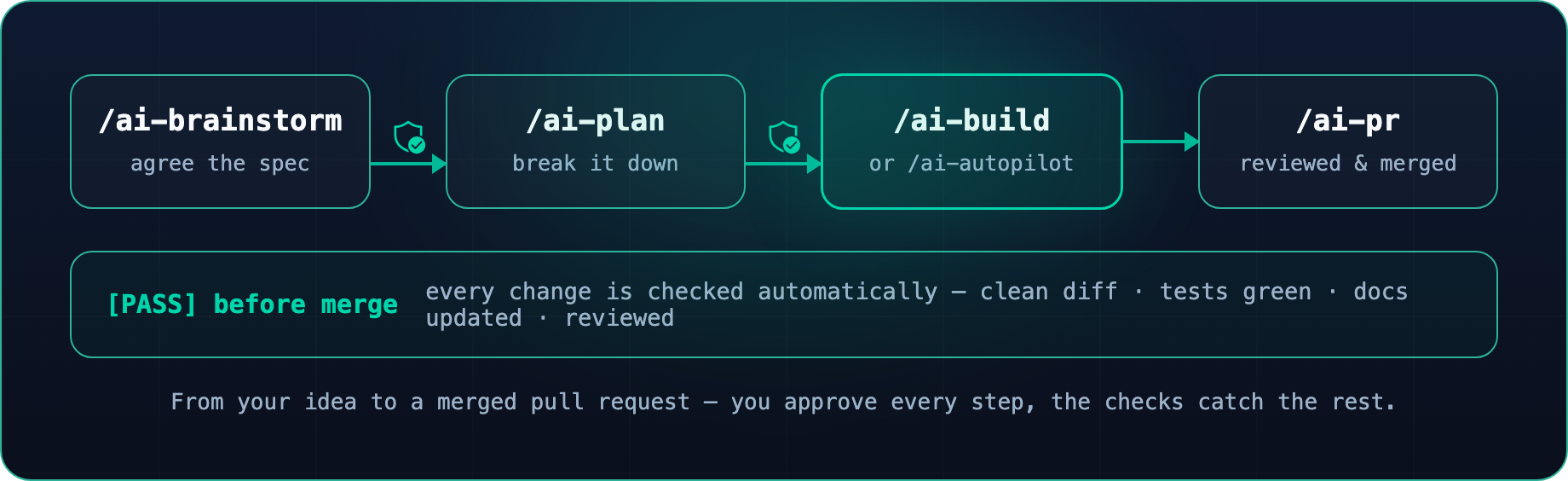
From idea to shipped — checked at every step.
You say what you want and approve each step. Automatic checks catch the rest — no leaked secret, broken doc, or untested change ever reaches your main branch.
One command in. A governed session out.
Press play: a real session installs the CLI, clears ai-eng doctorwith a [PASS], then runs the governed flow end to end — gates and all.
Governance that is enforced, not suggested.
Enforced by gates, not honoured by convention — the rules hold whether or not anyone is watching the PR.
What you approved is what shipped
A brainstorm gate and a spec state-machine keep every change anchored to the spec you approved — so spec and code never drift apart.
Every tool call is screened first
A deterministic guard checks every edit, write, and shell command — and stops the risky ones before they run.
Every bypass has an owner and an expiry
No # noqa, no @ts-ignore. Each suppression is refactored or formally risk-accepted with a severity-based TTL.
An audit trail you own
Every AI action appends to a hash-chained log you can verify offline. No telemetry by default.
Beyond governance
Built to ship the whole project, not just gate it.
For regulated teams, a solo developer, or a company whose agents ship code themselves — the same gates, entirely on your machine. No control plane, no lock-in.
Security-first — proven on itself
The framework builds itself under its own gates.
- dogfooded gates
- SonarCloud gate
- Snyk
- gitleaks
- semgrep
- SBOM
- SHA-pinned
- signed provenance
Context-efficient
Loads only what each task needs — the rest stays on disk, so the AI stays fast and focused.
- lazy-loaded skills
- top-5 skill ranking
- 16 KB tool offload
- isolated subagents
- hot-path cache
Built for engineering
- simplify
- explain
- onboard
- debug
- review
- verify
Beyond code
- design
- slides
- visual
- animation
- media
- prose
Works where you work
- 6 IDE surfaces
- MCP-native
- GitHub
- Azure DevOps
Yours to extend
- composable skills
- Engram memory (optional)
- no control plane
- no lock-in
The toolkit
Fifty-four skills, nine agents, one flow.
Every capability is a /ai- command on an isolated agent context. Learn it once — it travels with the repo, identical on every surface.
- 54skills
- 9agents
- 6surfaces
- 1governed flow
Plan & build
brainstorm · plan · build · autopilot
Ship safely
review · verify · test · security
Design & docs
design · visual · slides · docs
Research & learn
research · explore · explain · note
Same flow, every surface
- Claude Code
- GitHub Copilot
- Codex
- Antigravity
- OpenCode
- Cursor
Get started
Up and running in four steps.
Two in your terminal, two in your editor — every step shows you exactly where you are, so nothing runs in the wrong place.
Install the CLI
$ uv tool install ai-engineeringPrefer pipx or pip? Both work too.
Add governance to your project
$ cd your-project
$ ai-eng install .
$ ai-eng doctor
  [PASS] hooks · mirrors · manifest · tools
Governance is now versioned local files in your repo.
Open your editor and start a session
› /ai-start
  [ready] context loaded · gates armed · audit live
Ease in — start observe-only and switch gates on as they earn it.
Ship through the governed chain
› /ai-brainstorm → /ai-plan → /ai-build → /ai-prYou drive the intent; deterministic gates catch the rest before merge.
Staying current
Install once. Update in two commands.
$ ai-eng version upgrade   # 1 · the CLI, on any machine
$ ai-eng update --apply    # 2 · the framework, in each project
It is yours — versioned local files, no hosted control plane, no lock-in. Delete the directory to leave; that's the whole exit cost.